The free restaurant POS that never needs the internet
NodeDR OrderRestro is a free, open-source restaurant management system — billing, tables, a live kitchen screen, reservations, and customer loyalty. It runs on a computer inside your restaurant, so service keeps running even when the WiFi doesn’t.
No credit card, no account, no trial period — download the code and run it.
ORDERRESTRO
RUNS ON YOUR OWN TILL
YOUR RESTAURANT · YOUR DATA
YOUR SERVER, NOT OURS
- AGPL-3.0 LicenseFree to use, modify, self-host
- Offline-firstKeeps running with no internet
- Self-hostedYour data stays on your server
- Live kitchen displayNo paper tickets to lose
- Every device on WiFiTills, tablets, kitchen screen
- Open sourceFork it, extend it, own it
Everything a restaurant floor and kitchen need
Built for dine-in, takeaway, and kitchen operations — not a retail checkout with a menu bolted on.
POS & billing
Ring up dine-in, takeaway, and delivery orders. Split or merge bills, apply discounts and gift cards, add tips, take cash/card/UPI or a mix of payments, and process refunds — all from one screen.
Multi-region tax
Each branch picks its own tax setup in Settings — India GST, US Sales Tax, EU VAT, Spain IVA, or a custom regime — with the right receipt label, registration-number field, and tax-inclusive or tax-exclusive pricing for that region.
Tables & floor plan
A visual floor plan shows which tables are free, seated, or reserved at a glance. Seat a walk-in, add them to the waitlist, or move a party to a bigger table in a couple of taps.
Live kitchen display
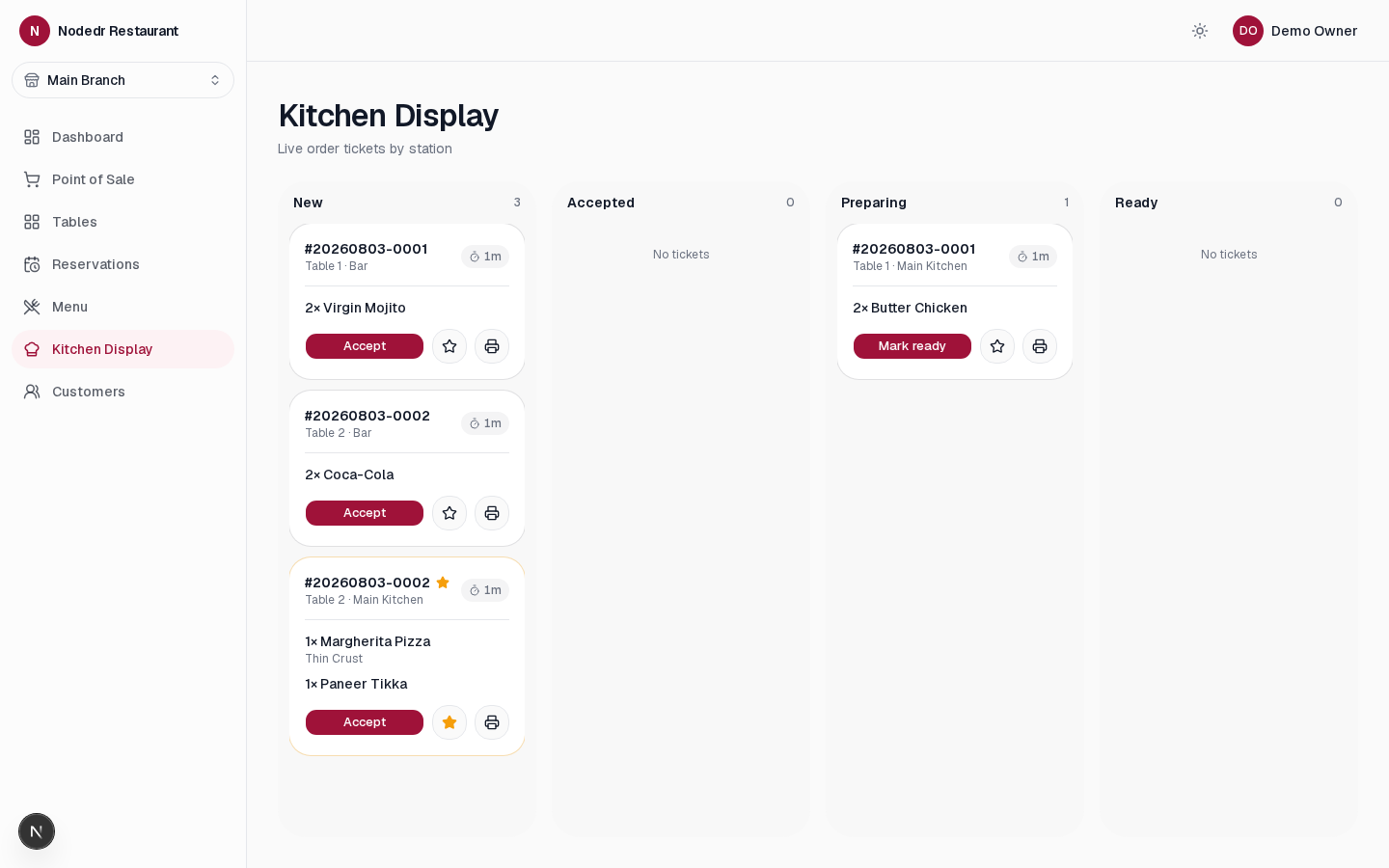
Orders appear on a kitchen screen the moment they're sent — routed to the right station, with priority tickets and live timers so nothing sits forgotten under the pass.
Menu & combo builder
Organize your menu into categories, add modifier groups (extra cheese, spice level, no onions), build combo meals, and mark items unavailable the moment you 86 them.
Reservations & waitlist
Take bookings, manage the day's seating, and keep a live waitlist with estimated wait times — synced to the same floor plan your host and servers already use.
QR table ordering
Every table gets a QR code that opens your live menu — guests browse and place their own order straight from their phone, in English, Spanish, or French, no app download needed.
Inventory & stock
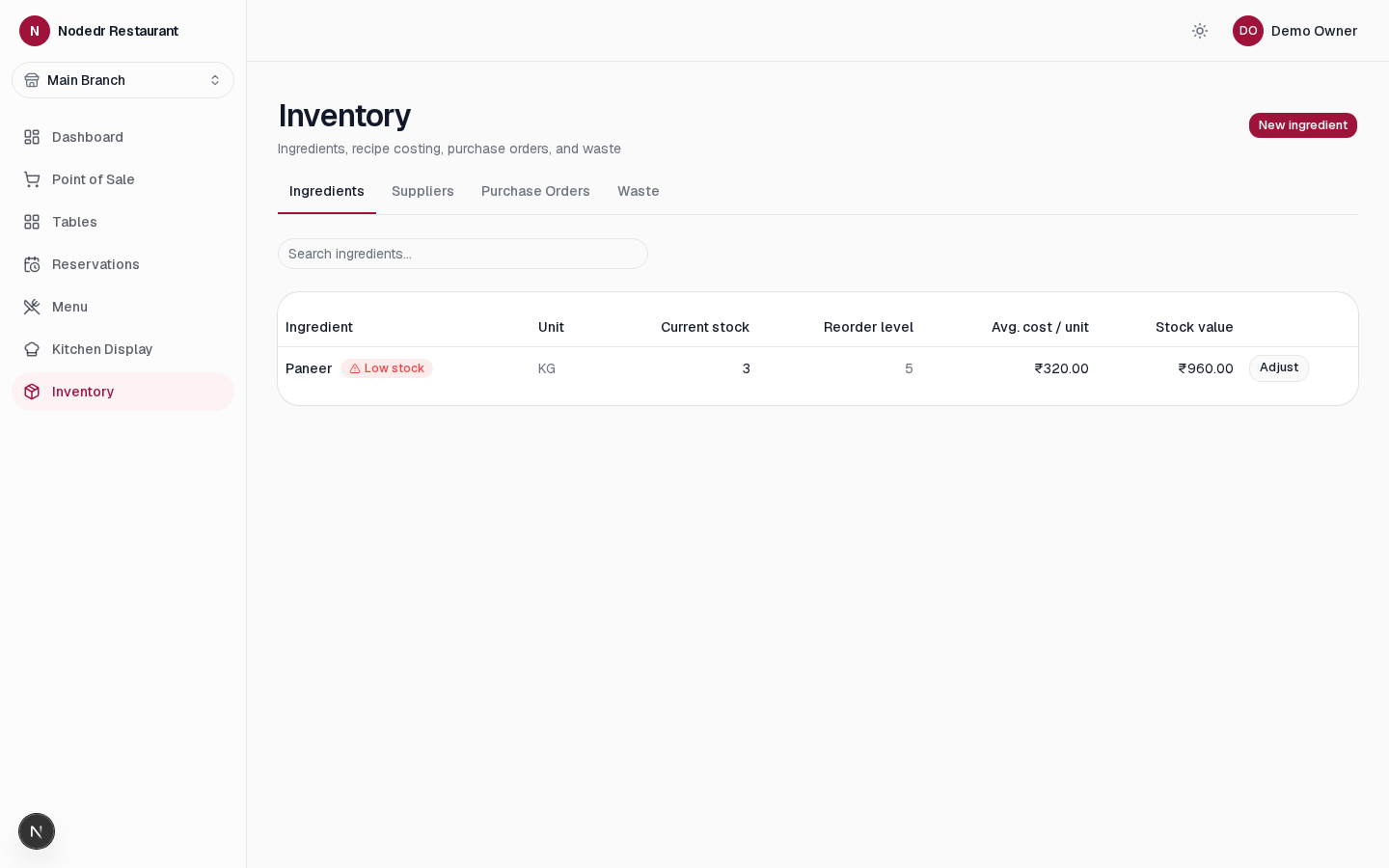
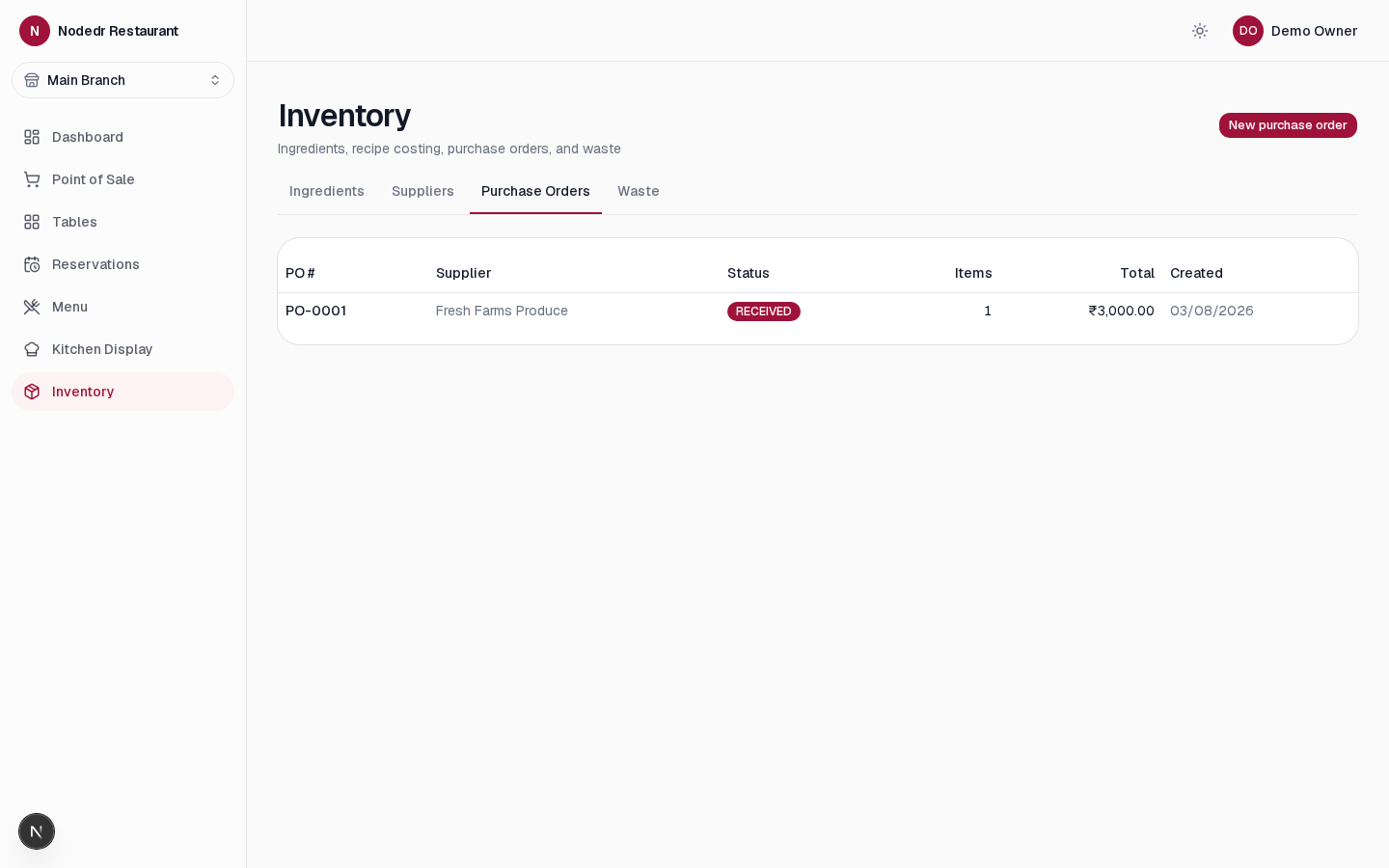
Track ingredients, not just finished dishes. Recipe-based costing, purchase orders, supplier goods receipts with batch and expiry tracking, and waste logging — stock is deducted automatically as orders are billed.
Customer profiles & loyalty
Every guest gets a profile with visit history, loyalty points, and feedback. See your regulars and reward them without a third-party loyalty app.
Staff accounts & permissions
Give each staff member their own login with exactly the permissions their role needs — a server shouldn't be able to edit the menu, and a cashier shouldn't see payroll.
Real-time dashboard
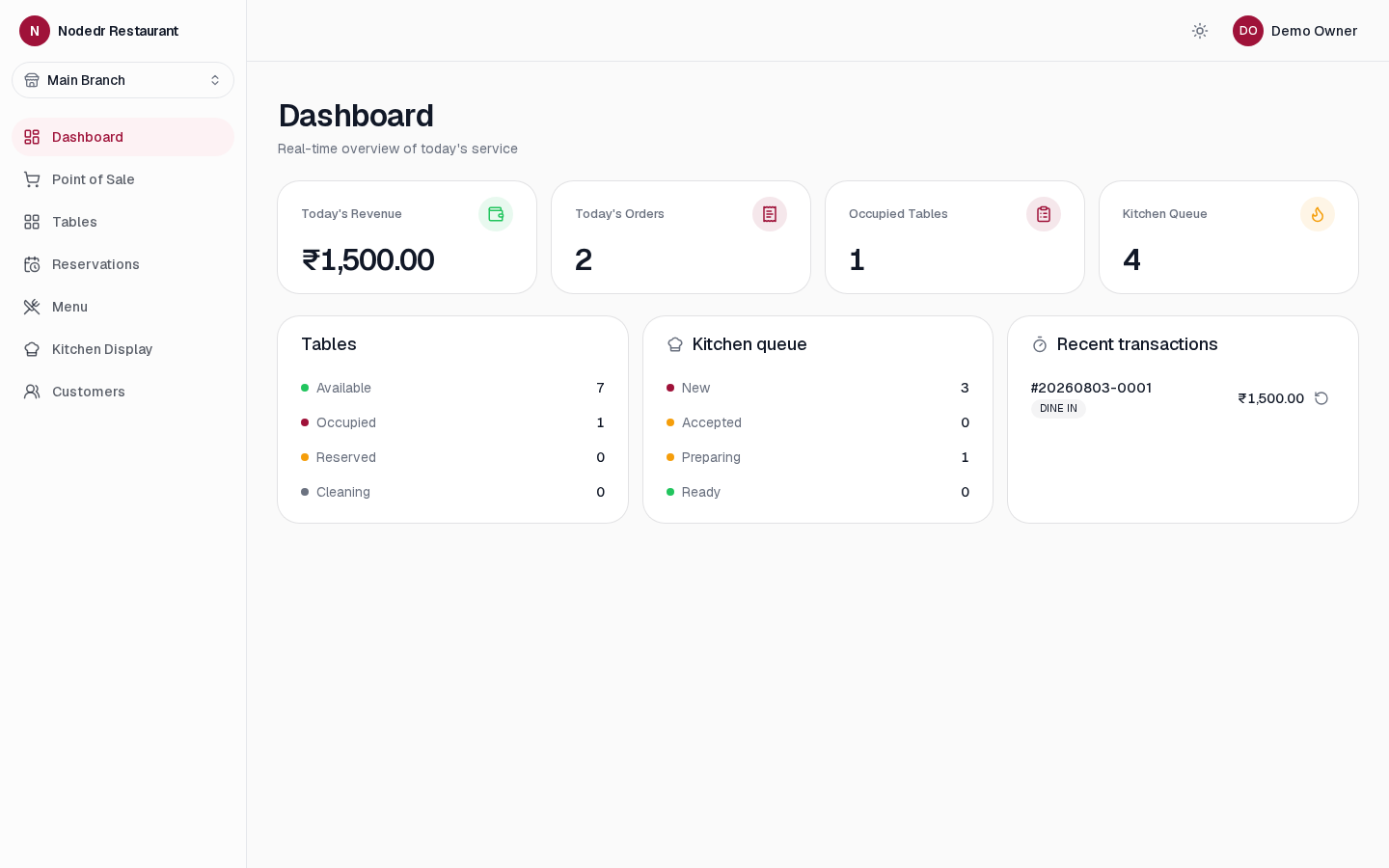
Today's revenue, order count, occupied tables, and kitchen queue update live as service happens — one screen tells you how the shift is actually going.
Printable receipts
Print a receipt on any printer connected to the till through your browser's print dialog, or save it as a PDF — no special thermal-printer driver required to get started.
Works offline, on your network
The whole system runs on a computer inside your restaurant. Every till, tablet, and kitchen screen on the same WiFi keeps working — orders, billing, and printing — even if the internet connection drops.
Backups & one-click updates
Connect any S3-compatible bucket and download or restore a full backup any time — plus a one-click update button in Settings that pulls the latest release and restarts the app for you.
Website API & MCP server for AI
An Integration API lets your restaurant's own website place real orders and bookings straight into OrderRestro, showing up live on the dashboard and kitchen display. A separate MCP server lets Claude or any MCP-compatible AI check today's orders or manage reservations for you.
See it in action
Real screenshots from a running NodeDR OrderRestro instance — the dashboard, POS, kitchen display, floor plan, and more.
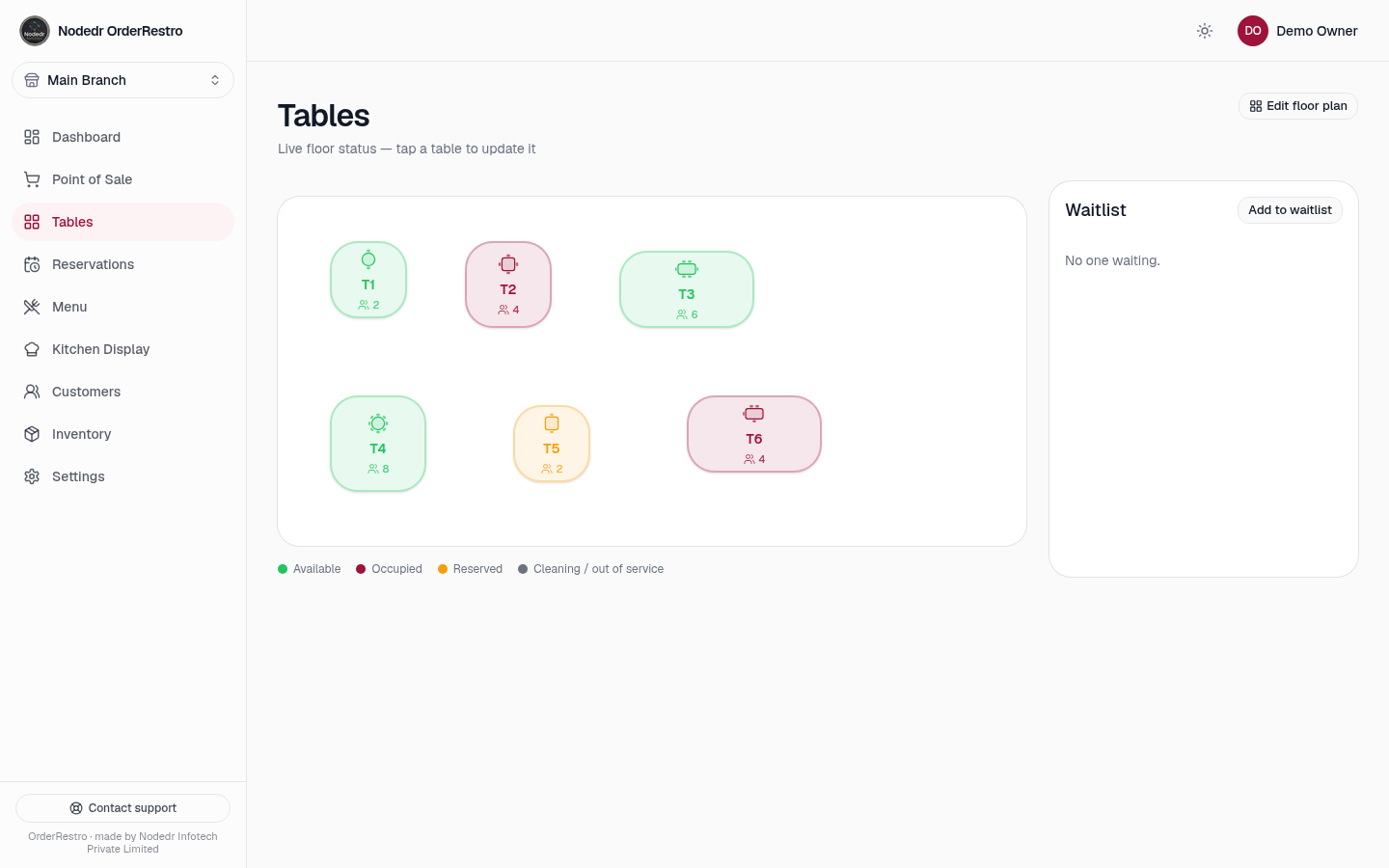
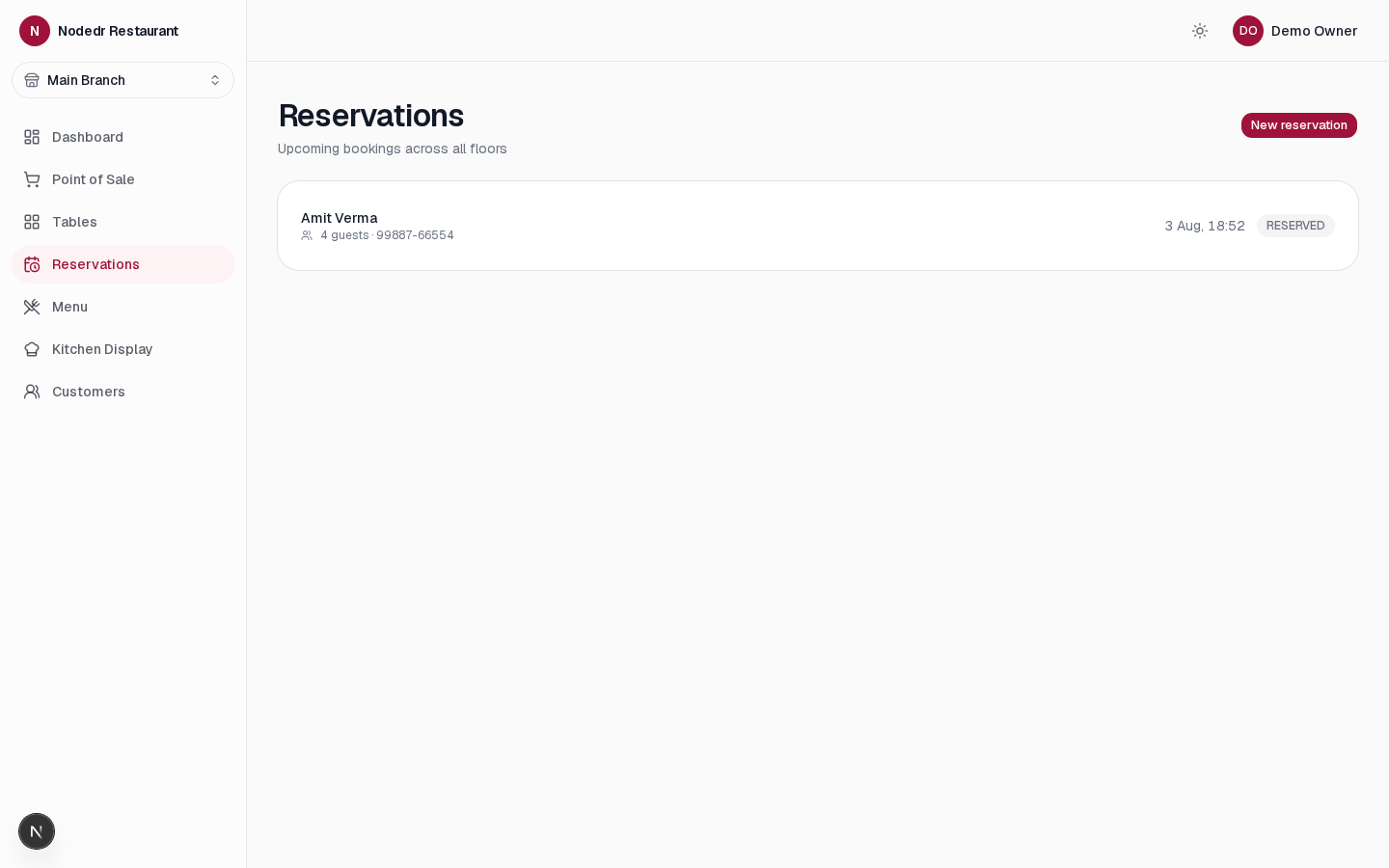
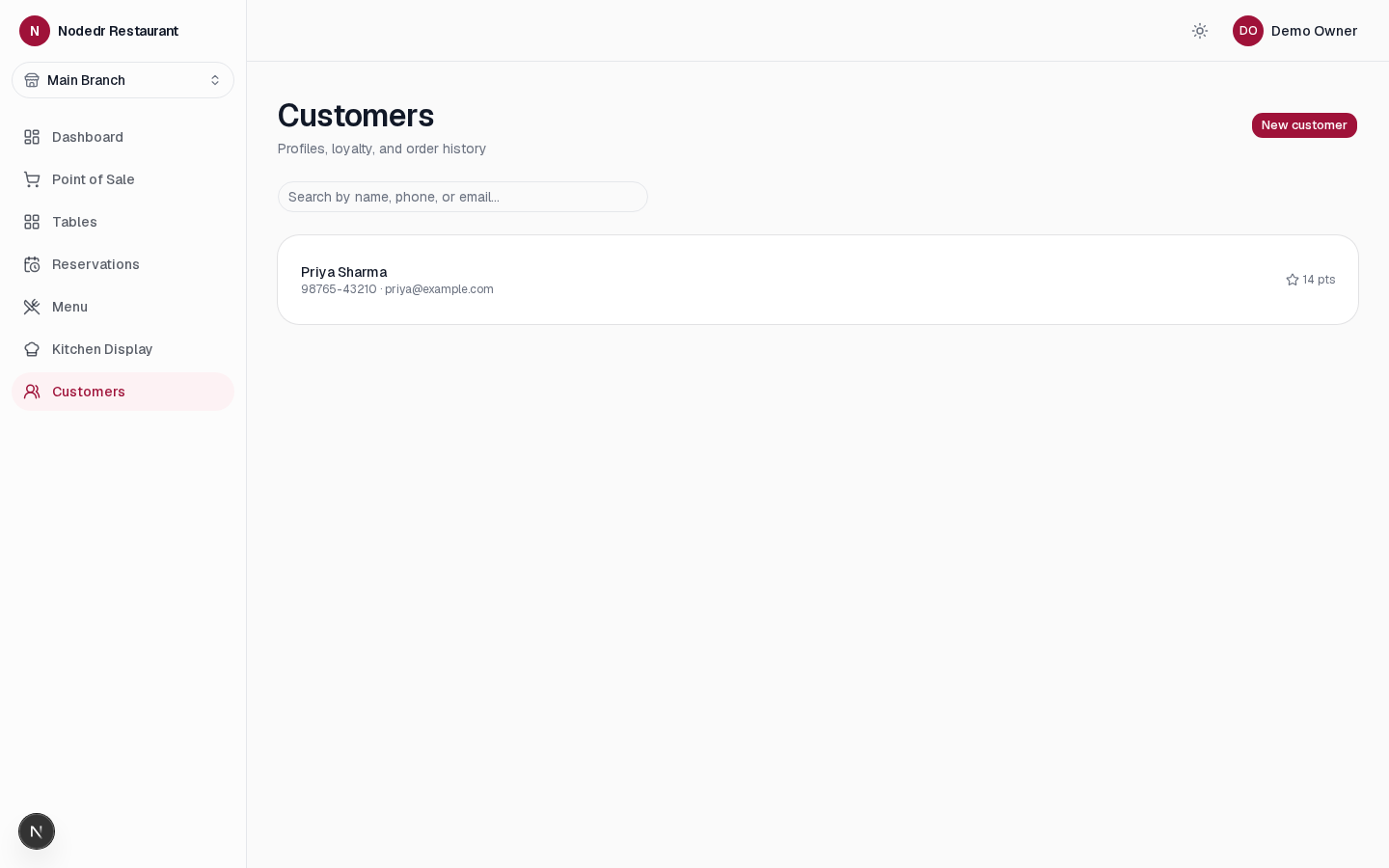
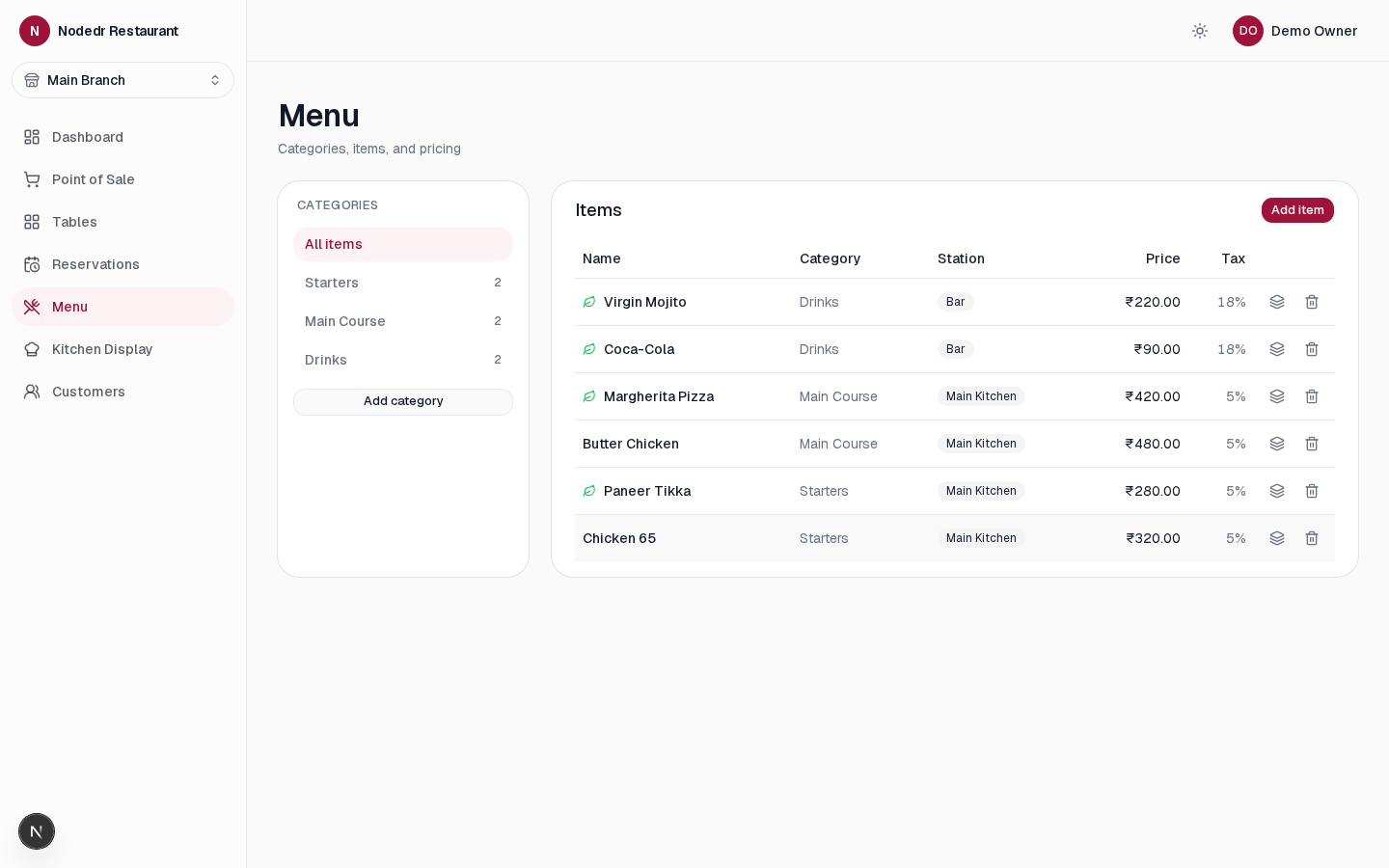
One setup, wherever you need it
“Offline-first” describes how it runs, not where it has to live. Same software, same data, same login — no separate “cloud” mode to configure.
Default, recommended
A local LAN server
One machine in the restaurant runs the software. Every till, tablet, and kitchen screen on the same WiFi or Ethernet reaches it. No internet connection is needed once it's running — order-taking, billing, the kitchen display, and printing all keep working with the WAN cable unplugged.
For remote management
Any VPS or cloud server
The identical setup also runs unmodified on a rented cloud server (DigitalOcean, Hetzner, AWS, etc.) if you'd rather manage one restaurant — or several branches — remotely instead of on-site. Nothing else about the software changes.
Reachable from outside the LAN
Behind a tunnel
Point a tunnel (Cloudflare Tunnel, ngrok, Tailscale Funnel, or any reverse proxy) at it for a real HTTPS address with no port-forwarding. Once traffic reaches it over https://, turn on Secure cookies in settings — plain http:// LAN setups leave this off by default.
One-click app install
CasaOS / ZimaOS
Pre-built images, no build step — install straight from an app manifest URL on a CasaOS or ZimaOS home server. Official app store submission is pending; it installs today via CasaOS's own custom-install flow.
Install nowAny device on the restaurant’s network
The server runs on Linux, macOS, or Windows. Every till, tablet, or phone on the same network opens it straight in a browser — no per-device app to install.
How it works
One port exposed. The web app proxies API calls to the backend over the internal Docker network — the backend and database are never reachable from your LAN directly.
  Browser / LAN tablet
        │  http://<machine>:1995   (the ONLY exposed port)
        ▼
┌──────────────────────────┐  /api/* proxied server-side  ┌──────────────────────┐
│   web  :1995              │ ──────────────────────────▶  │  backend (internal)  │
│   Next.js / React         │ ◀──────────────────────────  │  NestJS + Socket.IO  │
└──────────────────────────┘   (internal Docker network)   └──────────┬───────────┘
                                                                       │
                                                                       ▼
                                                          PostgreSQL (Docker volume)
                                                          Your data never leaves
One port, one origin
Port 1995 is the only exposed port. The API and its Swagger docs are reachable only through the web app's /api proxy — never published directly to your network.
Realtime, not polling
A Socket.IO gateway pushes table, kitchen ticket, and order updates into a per-restaurant room the instant something changes — screens update themselves.
Data in a Docker volume
PostgreSQL persists in a named Docker volume. Containers restart, rebuild, and update; your orders, menu, and inventory stay untouched.
Connect it to your website and your AI tools
OrderRestro isn’t only a counter till. Two API surfaces, both scoped and revocable, let it plug into things that aren’t a physical POS screen.
Take orders straight from your restaurant’s website
Your website’s own backend calls the Integration API to browse the live menu, place a takeaway or delivery order, or book a table — the same way it would call any other backend. The order lands on the OrderRestro dashboard and kitchen display the instant it’s placed, exactly like an order taken at the counter. No manual re-entry, no separate “online orders” spreadsheet to check.
Run it from Claude or any MCP-compatible AI
OrderRestro ships its own MCP server. Point an AI assistant at it with a personal API key and ask it to pull today’s dashboard summary, list open orders, or create a booking — each request is checked against the exact same permissions the key owner has in the app, so it can never do more than they personally could.
How OrderRestro stacks up
Versus a hosted subscription POS and the pen-and-spreadsheet approach.
Platforms like Petpooja sell on simplicity and support — a fair pitch for a first POS. We optimize for a different number: how many taps it takes to ring up a table, since that’s the number your staff feels on every single order.
Cost
Billing on one screen, no tab-switching mid-sale
Works without internet
Live kitchen display
Table & reservation management
Menu & combo builder
Inventory & recipe costing
Customer loyalty program
Staff accounts & permissions
Printable receipts
Data stays on-site
No vendor lock-in
Open source
Up and running in under 10 minutes
No manual setup, no config files to edit. If you're not comfortable with a computer terminal, any local IT helper can run the one command below for you.
Install (or update) with one command
Pick your OS below. One command checks for Docker and git, installs either if missing, then clones the repo and runs the installer — builds both images, starts the stack, and prints the URL when ready.
Installs Docker Desktop and git via Homebrew if either is missing.
Open it in a browser
Once setup finishes, open the address it prints in any browser and sign in. A short wizard then walks you through your restaurant's name, tables, and first menu items.
# Open in a browser:
http://localhost:1995
Start taking orders
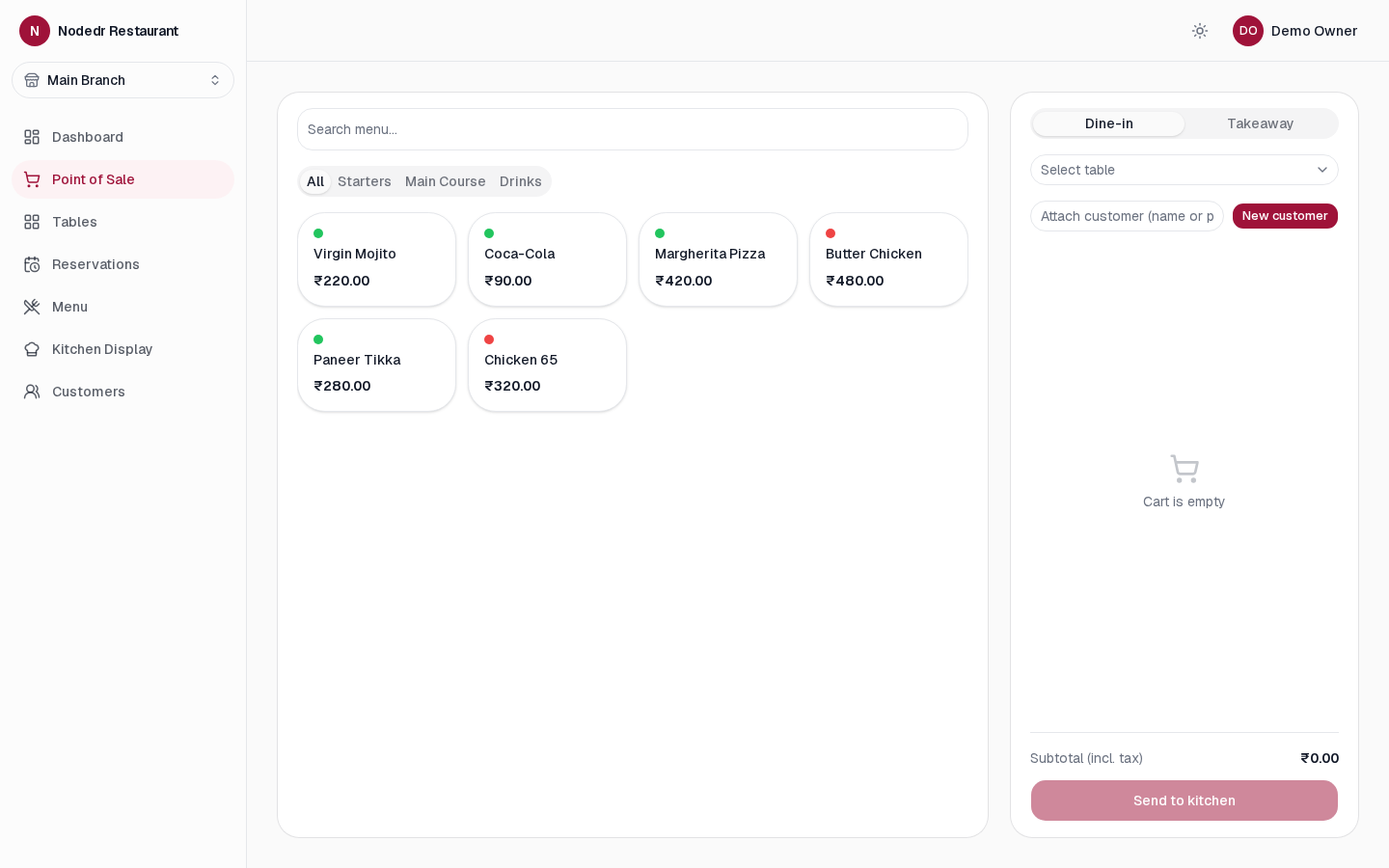
Add your menu, then go to Point of Sale — tap items, pick a table, send to the kitchen. Any tablet or phone on the same WiFi can be a second till.
# From any device on the restaurant's WiFi:
http://<restaurant-computer's-address>:1995
On Windows 10 or 11? Skip Docker entirely.
Get NodeDR OrderRestro from the Microsoft Store. It installs as a Windows service that starts automatically at boot, updates itself, and runs sandboxed — no terminal, no Docker, no Node.js install required.

What’s built, and what’s next
OrderRestro is under active, transparent development. This is the real phased plan — checkboxes in the repo, not marketing promises.
Foundation
Shipped- Monorepo & shared types — pnpm + Turborepo, Zod schemas shared between the API and web app via one source of truth.
- Auth & RBAC — JWT httpOnly cookie sessions, PIN quick-switch, granular per-role permissions seeded across 11 restaurant roles.
- Design system foundation — Wine/burgundy theme tokens, light + dark palettes, a responsive shell verified on desktop and mobile.
- Docker Compose stack — Postgres, backend, and web services building and running end to end.
Core POS
Shipped- Menu management — Categories, items, and modifier groups with default selections and min/max limits.
- Floor & table management — Floors, table tiles, and live status shown on one floor view.
- POS order screen — Dine-in and takeaway, category tabs, modifier picker, running cart.
- KOT generation — Orders routed to kitchen stations with a full status lifecycle.
- Live Kitchen Display — Updates in real time, elapsed-time timers, a warning past 15 minutes.
- Billing & checkout — Per-branch tax regime (India GST, US Sales Tax, EU VAT, Spain IVA) with tax correctly backed out or added on top, discounts, multi-payment, printable receipts — including direct-USB thermal printing, not just the browser print dialog.
- Dashboard v1 — Today's revenue, orders, table status, and kitchen queue at a glance.
Kitchen depth & reservations
Shipped- Reprint & priority tickets — Reprint any KOT, flag a ticket priority, see a per-station performance report.
- Reservations — Full booking lifecycle, with the table's status updating automatically as a reservation moves along.
- Waitlist — Seat a walk-in straight from the floor view, table assigned in one action.
- QR table ordering — Each table gets a QR code that opens a public live menu a guest can order straight from — in English, Spanish, or French.
CRM, loyalty & combos
Shipped- Customer profiles — Order history, notes, allergies, birthday and anniversary — searchable at checkout.
- Loyalty points — Earned on every sale, redeemed at checkout, capped at the customer's balance and the bill total.
- Gift cards — Issue a card, look up its balance, redeem it as a payment source.
- Combo meals — A menu item can declare its component items through a combo builder.
- Billing depth — Tips, refunds capped at what's actually refundable, and merging two open tables' bills into one.
Inventory & store management
Shipped- Ingredient-based inventory — Weighted-average cost, recomputed automatically on every goods receipt.
- Recipes & live costing — A recipe's cost recalculates from current ingredient prices, not a stale snapshot.
- Purchase orders & goods receipts — Full PO lifecycle with batch/lot and expiry tracking on every delivery.
- FIFO waste logging — Priced at the actual batch that spoiled, not a blended average.
- Automatic stock deduction — Ingredients deduct on checkout, but a stock shortfall never blocks a paid sale.
- Procurement depth — Vendor quotations with side-by-side price comparison, staff purchase requests with an approval flow, and vendor invoices with payment tracking.
Delivery & online ordering
Planned- Delivery management — Delivery zones, charges, delivery staff, live tracking, and history.
- QR ordering depth — Guests can already place an order from the table QR code; per-item modifier customization, request-waiter, and request-bill are still to come.
- Online ordering surfaces — A restaurant website, click & collect, and scheduled orders.
Staff, accounting & multi-branch
Planned- Employee records — Attendance, shift scheduling, leave, tip distribution, performance reports.
- Payroll — Run payroll directly from staff and attendance records.
- Accounting — Sales ledger, expenses, P&L, GST reports, bank reconciliation, daily cash closing.
- Branch management — Centralized reporting and inventory across multiple restaurant locations.
Reporting, marketing & maintenance
Future- Full reports catalog — Filterable, exportable (CSV/PDF/Excel), with scheduled email delivery.
- Analytics dashboards — Food cost, inventory valuation, peak hours, retention, and margins.
- Marketing — Coupons, promotions, happy hours, SMS/email/WhatsApp campaigns.
- Maintenance & documents — Equipment tracking, service schedules, and digital SOPs.
Hardening & packaging
Future- Hardware peripherals — Cash drawer, customer display, weighing scale, label printers — direct-USB thermal printing already shipped in Phase 4.
- Integrations — Payment gateways, SMS/email/WhatsApp, accounting software, delivery platforms.
- Security hardening — Two-factor authentication, a full audit log, backup/restore utilities.
- SQLite deployment variant — For very small single-till operators who'd rather not run Postgres.
- Native installers — Windows and Linux packages that skip Docker entirely, mirroring the sister product's approach.
Want to shape the roadmap?
Open a feature request on GitHub or contact us — this is early-stage with a lot of open scope, and community feedback drives what gets built next.
NodeDR OrderRestro is made and maintained by NODEDR INFOTECH PRIVATE LIMITED. It is free, open-source software released under the AGPL-3.0 License — you can use it, modify it, and run it in your restaurant with no restrictions.
Official website: www.nodedr.com
Common questions
Ready to run your restaurant for free?
One command. Your own computer. Your restaurant’s data stays where it belongs — with you.